
This post covers the following topics:
- How to add Open with NetBeans to windows file and folder context menu
- How to open any file in NetBeans without creating a project
- How to use NetBeans IDE as a file and folder explorer
- How to use the --open command line option for NetBeans IDE
--open command line option for NetBeans IDE
NetBeans IDE identified --open command line option and opens the file or folder given as an argument after this command line option. This fact makes the NetBeans IDE useful to open any file and folder through command line. In windows we can use this feature to introduce a context menu for files and folders in Explorer by tweaking the Windows Registry.
Adding Open with NetBeans option to windows context menu
In windows we can add two extries to the Windows Registry to add Open with NetBeans option to the Windows Explorer context menu. These entries need absolute path of the NetBeans IDE executable so while trying this trick please check the NetBeans IDE executable path.
My NetBeans IDE 6.5 executable path is
C:\Program Files\NetBeans 6.5\bin\netbeans.exe
We can add the registry entries manually by opening the regedit.exe application from the Start > Run menu, or we can create a REG file to achieve this. Creating the REG file is the easiest option. We will create a file with name openwithnetbeans.reg and we will copy the following contents in that file. Double clicking this REG file will add these registry entries to the Windows registry as required.
Windows Registry Editor Version 5.00
[HKEY_CLASSES_ROOT\*\shell\Open with NetBeans\command]
@="\"C:\\Program Files\\NetBeans 6.5\\bin\\netbeans.exe\" --open \"%1\""
[HKEY_CLASSES_ROOT\Folder\shell\Open with NetBeans\command]
@="\"C:\\Program Files\\NetBeans 6.5\\bin\\netbeans.exe\" --open \"%1\""
Now when we open the Explorer and right click on a NetBeans project folder we get option as Open with NetBeans and clicking on this option will start the NetBeans IDE and will open this project in the IDE.

We can see the project open in the NetBeans IDE for us.
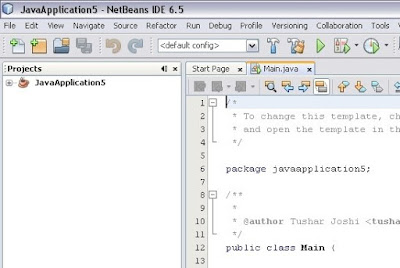
When NetBeans IDE is already open this command will open the project in the existing IDE.
Opening any file in NetBeans IDE from Windows Explorer
Now when we right click on any file in the Windows Explorer we get the same option of Open with NetBeans and the file gets open in the existing NetBeans IDE or if it is not open a new one is started for us.
This makes NetBeans IDE a general purpose editor for me to edit any file in my computer.
with regards
Tushar Joshi, Nagpur


